Course Reports Calendar – Fall B Term/Semester 2026
Frequently Asked Questions
...Student
What are course report surveys?
Surveys are sent to students at the end of all lecture, lab, and seminar courses to give them an opportunity to share feedback about their experience in the course and with the instructor. The responses to these surveys are helpful to WPI’s continued improvement.
When can I fill out my course report surveys?
Course report surveys open one week before the final day of the term, or the final day of the course in the case of graduate classes that do not follow the typical term schedule. Click here to view the WPI Academic Calendar.
| Term | Course Reports Open |
|---|---|
| Fall A Term | 10/2/2026 – 10/9/2026 |
| Fall B Term/Fall Semester | 12/3/2026 – 12/11/2026 |
| Spring C Term | 2/27/2027 – 3/5/2027 |
| Spring D Term/Spring Semester | 4/28/2027 – 5/5/2027 |
| Summer E1 Term | 6/18/2027 – 6/25/2027 |
| Summer E2 Term | 8/2/2027 – 8/9/2027 |
Who sees my responses?
Results for selected ranked-choice questions are reviewed by deans and department heads. Open-text responses are seen only by the instructor. Ranked-choice response totals per class are available to WPI students, staff and faculty through OSCaR.
Are my responses confidential?
Yes, your responses are separated from your identifying information as soon as they are submitted.
How can I fill out my course report surveys?
Via E-Mail notification:
Students will receive an email from WPI Course Reports <noreply@qemailserver.com> when the course report window opens that will include a link to your surveys. You will also receive additional reminders during the survey period.
Via Canvas:
Students may also access their course report surveys by clicking the ‘Student Course Reports’ link in the ‘Account’ menu in Canvas.

Can I redo a survey I have already submitted?
Unfortunately not. Responses are not saved with student identifying information, so we cannot identify and reverse a single submission. Please take care to confirm that you are submitting responses for the correct class by scrolling to the top of the survey and verifying the course name and instructor before clicking the Next Page button.
My survey isn’t loading. What should I do?
Users have reported issues accessing course reports using the Opera internet browser. If you are using Opera, please try accessing your surveys with another browser. If you continue to experience problems, please e-mail coursereports@wpi.edu.
What is OSCaR?
OSCaR is WPI’s Online Student Course Report dashboard available at oscar.wpi.edu. This resource is intended to provide the WPI community access to a single class’s numeric course report results at a time. Note that this limitation is by design and we are unable to provide any comparative data or a full export of this information.
What should I do if I have more questions?
Please e-mail coursereports@wpi.edu and you will receive a reply within one business day.
...Instructor
When are course report surveys open?
Course report surveys are sent to students one week before the final day of the term, or the final day of the course if the class does not follow the term schedule. Surveys will remain open for students until midnight on the final day of the term.
| Term | Course Reports Open |
|---|---|
| Fall A Term | 10/2/2026 – 10/9/2026 |
| Fall B Term/Fall Semester | 12/3/2026 – 12/11/2026 |
| Spring C Term | 2/27/2027 – 3/5/2027 |
| Spring D Term/Spring Semester | 4/28/2027 – 5/5/2027 |
| Summer E1 Term | 6/18/2027 – 6/25/2027 |
| Summer E2 Term | 8/2/2027 – 8/9/2027 |
Can I add additional custom questions to my course report surveys?
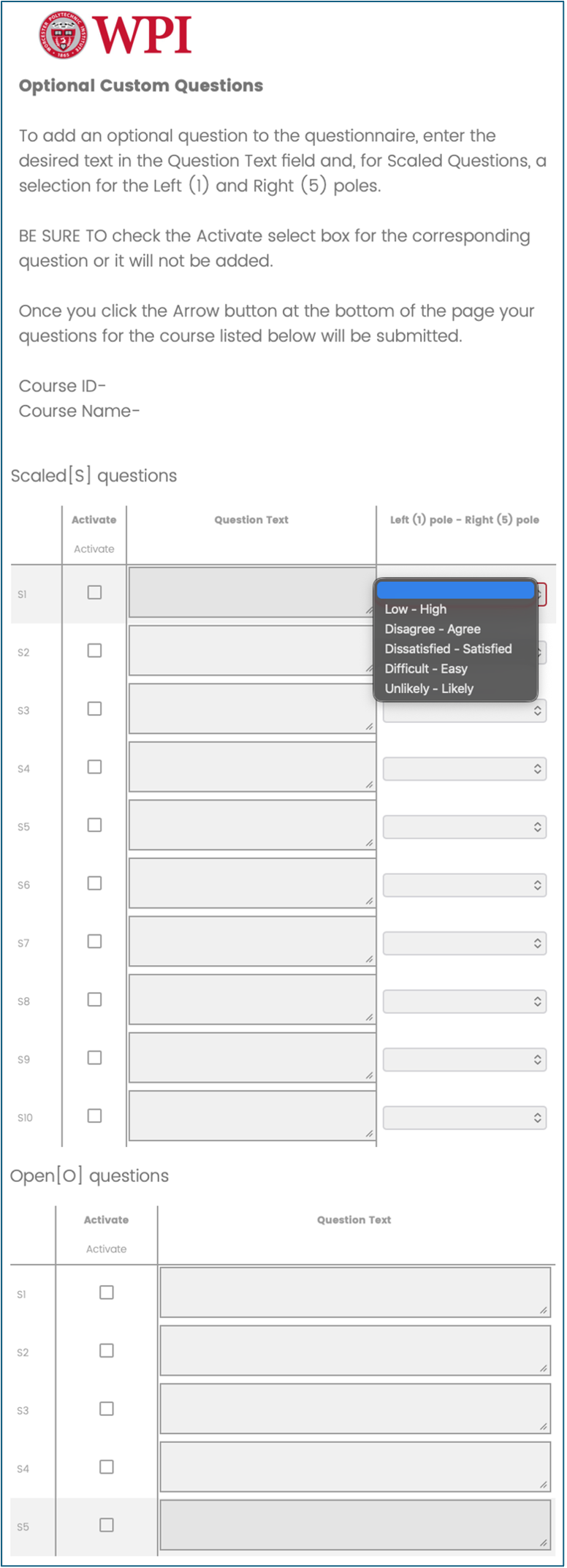
Yes, you will receive an e-mail invitation to submit up to five custom open response questions and up to 10 ranked choice questions for each of your classes, which will be appended to the end of the course report surveys. When adding custom questions, BE SURE to click the ‘Activate’ checkbox next to questions that you want to include with your surveys.

When can I enter custom questions for my course report surveys?
Custom question surveys are sent to instructors one week before course report surveys are sent to students, or two weeks before the end of the class. Instructors may add custom questions to their course report surveys until the course report surveys are sent.
| Term | Custom Questions Open |
|---|---|
| Fall A Term | 9/25/2026 - 10/2/2026 |
| Fall B Term/Fall Semester | 11/26/2026 - 12/3/2026 |
| Spring C Term | 2/20/2027 - 2/27/2027 |
| Spring D Term/Spring Semester | 4/21/2027 - 4/28/2027 |
| Summer E1 Term | 6/11/2027 - 6/18/2027 |
| Summer E2 Term | 7/26/2027 - 8/2/2027 |
How can I check the response rates for my course report surveys?
Instructors can check the response rates for their surveys through the course report response rate dashboard linked in Canvas (see image below). You must select one of your courses to highlight the ‘Courses’ menu before the link will be visible. You may also use the link below to access your dashboard.
Course Report Response Rate Dashboard


How can I view the results for my course report surveys?
Course report survey results can be accessed through a Qualtrics dashboard available through your Canvas login. To access the link, select any of your courses to activate the ‘Courses’ sidebar menu and select course report results. You may also access your dashboard by clicking the link below.
Course Report Results Dashboard

When can I view the results for my course report surveys?
Course report results will be made available after grades are due for the term. The schedule for report availability is below:
| Term | Course Report Results Available |
|---|---|
| Fall A Term | 10/16/2026 |
| Fall B Term/Fall Semester | 12/17/2026 |
| Spring C Term | 3/11/2027 |
| Spring D Term/Spring Semester | 5/9/2027 |
| Summer E1 Term | 7/1/2027 |
| Summer E2 Term | 8/13/2027 |
Can I print or export my course report dashboard?
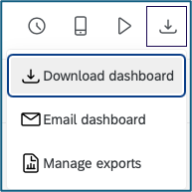
Yes, you can print or export your dashboards in Qualtrics by clicking the export icon at the top right of the dashboard. Note that the export will show the dashboard as it is filtered on your screen.

Why isn’t a course I taught showing up in my dashboard?
The Qualtrics dashboards only have access to submitted results, so a course will only appear on your dashboard when at least one response has been submitted for it. If you think that responses should have been submitted but you still do not see the course, please contact coursereports@wpi.edu.
How can I access course reports for my classes from before Qualtrics?
If you need reports for your classes from 2023 or earlier, or need your results provided in another format, please e-mail coursereports@wpi.edu.
What should I do if I have more questions?
Please e-mail coursereports@wpi.edu and you will receive a reply within one business day.
What does the survey look like?
The course report survey consists of 19 ranked-choice questions and four open-response questions covering topics such as instruction, grading, and course content. Additional questions are included for Laboratory and Great Problems Seminar classes, and instructors may add additional custom questions as well.
Very Poor (1) (2) (3) (4) (5) Excellent
- My overall rating of the quality of this course is:
- My overall rating of the instructor’s teaching is:
- The educational value of the assigned work was:
- The instructor’s organization of the course was:
- The instructor’s clarity in communicating course objectives was:
- The instructor’s skill in providing understandable explanations was:
Relative to other college courses I have taken:
Much Less (1) (2) (3) (4) (5) Much More
- The amount I learned from the course was:
- The intellectual challenge presented by the course was:
- The instructor’s personal interest in helping students learn was:
- The instructor stimulated my interest in the subject matter:
- The amount of reading, homework, and other assigned work was:
How frequently were the following statements true in this course?
Always (1) (2) (3) (4) (5) Never
- The instructor was well prepared to teach class.
- The instructor encouraged students to ask questions.
- The instructor treated students with respect.
- Instructor feedback on exams/assignments was timely and helpful.
- The exams and/or evaluations were good measures of the material covered.
- My grades were determined in a fair and impartial manner.
- What grade do you think you will receive in this course?
(A) (B) (C) (NR/D/F) (Other/Don’t Know)
- On average, what were the total hours spent in each 7-day week OUTSIDE of formally scheduled class time in work related to this course (including studying, reading, writing, homework, rehearsal, etc.)
(0 hr/wk) (1-5 hr/wk) (6-10 hr/wk) (11-15 hr/wk) (16-20 hr/wk) (21 hr/wk or more)
Open Response
- What did you particularly LIKE about this course/lab?
- What did you particularly DISLIKE about this course/lab?
- Can you suggest anything that the instructor could do to improve the quality of teaching?
- Would you encourage a friend to take a course from this instructor? Why or Why not?
For laboratory courses only:
(1) Never (2) Seldom (3) Sometimes (4) Often (5) Always
- The instructor showed me how to use lab equipment properly.
- The lab and/or computer equipment was in good operating condition.
- Good laboratory procedures were emphasized
Very Poor (1) (2) (3) (4) (5) Excellent
- Relative to other lab experiences, the intellectual challenge presented by the lab assignments was:
- Relative to other lab experiences, the clarity and specifics of lab assignment objectives was:
For Great Problems Seminar Courses Only:
Because of work in this class, I feel I have developed skills in the following areas:
Disagree (1) (2) (3) (4) (5) Agree
- TEAM WORK: Collaborate effectively on a team.
- RESEARCH: Find varied, credible sources, assess their claims and relevance, and use them appropriately.
- WRITING: Produce clear, effective, evidence-based writing.
- PRESENTING: Prepare and confidently deliver engaging and effective presentations.
- APPROACH TO PROBLEMS: When working on complex, open-ended problems, be able to identify answerable questions, and select and evaluate suitable solutions through the application of multiple perspectives and disciplines.
- CULTURAL AWARENESS: Understand and articulate differences in experiences of the “great problem” for different people.
- VALUES: Describe your values and those of others as they relate to addressing the “great problem”.